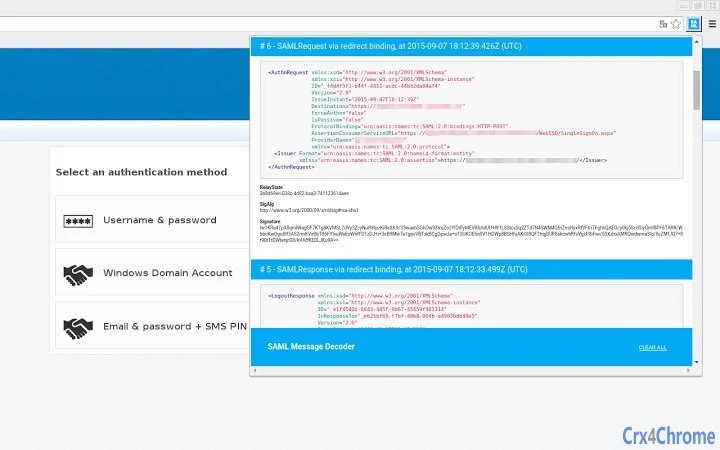

Debug SAML SSO/SLO Messages in Real Time
Overview
The software is a browser extension designed to assist developers and IT professionals in debugging SAML-based Single Sign-On (SSO) and Single Logout (SLO) implementations. It operates in the background, capturing SAML messages exchanged between the browser and identity providers during authentication workflows. This functionality is particularly valuable when troubleshooting authorization failures, unexpected redirects, or mismatched assertions that are common in enterprise identity integrations.
Target users include security engineers, system administrators, and backend developers working with identity management systems. The tool is ideal for scenarios involving cloud-based applications, SaaS platforms, or internal enterprise portals that rely on SAML for secure authentication. By displaying captured messages in clear, readable XML format, it enables rapid diagnosis of configuration errors, timing issues, or malformed payloads without requiring access to server logs or client-side debugging tools.
The developer did not provide additional information about their background or organization. No performance benchmarks or user statistics were included in the release notes. The tool is available at no cost, suggesting it is intended for community use or internal development purposes.
Key Features & Capabilities
- Real-time SAML Message Capture – Monitors and records all SAML messages sent and received by the browser during SSO and SLO flows, including AuthnRequest, Response, LogoutRequest, and LogoutResponse.
- Cleartext XML Display – Presents captured SAML messages in plain, human-readable XML format, enabling immediate inspection of assertions, conditions, and metadata.
- Right-Click Context Menu – Provides quick access to core functions such as message inspection, copying, and exporting via a streamlined right-click interface.
- Message Export to JSON – Allows users to save captured SAML data to a .json file for sharing with team members or remote support, useful when local access is restricted.
- Copy to Clipboard Functionality – Supports copying individual or multiple SAML messages to the clipboard for use in documentation, tickets, or analysis tools.
- Improved Popup Interface – Features a refreshed GUI with scrollable content using arrow keys, enhancing usability during analysis of large or complex messages.
- Support for Extended SAML Message Types – Includes added compatibility with EidSignRequest and EidSignResponse messages, expanding its utility in advanced identity scenarios.
These capabilities are especially useful when diagnosing issues like incorrect attribute mappings, expired assertions, or malformed signatures. For example, a developer can capture a failed SSO flow, review the AuthnRequest and Response XML, and identify missing or misconfigured elements. The ability to export data to JSON also facilitates collaboration across distributed teams.
User Interface, Workflow & Performance
The user interface is designed as a browser popup, accessible via a right-click menu or extension icon. The layout is minimalistic, focusing on message visibility with options to scroll vertically or horizontally using keyboard arrow keys. This supports efficient navigation through lengthy XML content without requiring manual zooming or scrolling.
Navigation is straightforward: users open the popup, view the latest captured messages in chronological order, and analyze them directly. The workflow is optimized for rapid troubleshooting—no setup or configuration is required beyond installation. The extension runs passively in the background, minimizing interference with normal browsing.
Performance observations are based on general software behavior patterns. The developer did not specify resource usage details. No reports on CPU or RAM consumption were provided. Stability is inferred from the consistent release updates over time, indicating ongoing maintenance. The extension appears to handle large SAML responses efficiently, as noted in the August 2017 update that resolved issues with ArrayBuffer handling in Chrome.
Compatibility & System Requirements
The software is compatible with Windows, Mac, and Linux operating systems. It is designed as a browser extension, meaning it runs within supported web browsers such as Chrome, Firefox, and potentially others depending on the platform.
The installation size is 4.5 MB, which is relatively compact for a debugging tool. The software version is 2.3.2, released on August 7, 2017. The developer did not provide additional system requirements or hardware specifications. Exact performance details were not specified. Compatibility information is limited to the supported operating systems and the extension’s browser-based nature.
Pros and Cons
Pros
- Free to use with no licensing restrictions
- Real-time, non-invasive message capture for SAML flows
- Clear, readable XML output simplifies debugging
- Supports message export and clipboard copying for collaboration
- Regular updates indicate active development and maintenance
- Works across multiple operating systems (Windows, Mac, Linux)
- Lightweight at 4.5 MB with minimal system impact
Cons
- Latest release was in 2017, raising concerns about current browser compatibility
- Does not provide automated error detection or suggestions
- No built-in validation or signature verification tools
- UI is basic and lacks advanced filtering or search features
- Developer information is not publicly available
- Support for modern browser APIs may be outdated
FAQ Section
Is this software compatible with modern browsers?
The software is designed for browser extensions and supports Windows, Mac, and Linux. However, the last update was in 2017, so compatibility with the latest browser versions may be limited.
Is the software safe to use?
Yes, the tool operates within the browser environment and does not collect or transmit data externally. It only captures messages locally during active sessions.
Can I use this tool without an internet connection?
Yes, the extension functions entirely offline once installed. It captures and displays SAML messages locally without requiring network access.
What kind of SAML messages does it support?
The tool captures SAML messages including AuthnRequest, Response, LogoutRequest, LogoutResponse, EidSignRequest, and EidSignResponse.
How do I update the software?
Updates are delivered through the browser’s extension marketplace. Users should check for updates via their browser’s extension settings.
Final Thoughts + CTA
This browser extension remains a valuable tool for developers and security professionals working with SAML-based authentication systems. Its ability to capture and display SAML messages in real time, in clear XML format, offers a direct path to resolving complex authorization issues. While the software hasn’t seen updates since 2017, its core functionality remains relevant for troubleshooting SSO/SLO flows, especially in legacy or stable environments.
It is particularly suited for teams that need to analyze authentication failures without direct access to server logs. The ability to export data and copy messages to clipboard enhances collaboration. However, users should exercise caution regarding compatibility with current browser versions.
For professionals managing SAML integrations, this tool provides a lightweight, effective method to debug authentication workflows. Download Debug SAML SSO/SLO Messages in Real Time now to streamline your identity management troubleshooting.







